Custom Analysis & Advanced Features
In addition to the panel generation features presented in the quickstart guide, Cytomarker also enables custom analysis, such as evaluation of predefined panel lists.
Sections tagged with Local sessions indicate features in Cytomarker v0.2.0 or later that require installation from source and local running on a user's personal computer, which are not accessible through the shinyapps public deployment. For installation from source, please visit the Cytomarker Github page.
Local sessions: setting application configurations
If running Cytomarker locally, users can toggle on/off a variety of application run parameters in the inst/config.yaml file in the source code. This file contains the following parameters, each with a yes/no default that is converted into an R boolean when the application is run using cytomarker():
use_google_analytics: yes

subset_only_registry_catalog: no

star_for_catalog_product: yes

only_protein_coding: no

filter_human_gene_names: no

only_cell_surface_human: no
use_google_analytics: Whether sessions can be tracked using Google Analytics.subset_only_registry_catalog: If set to yes, subset the dataset used to only human genes in the antibody catalog. Recommended: setnowhen starting with a new dataset setyesonly if targets with an online antibody product are required for all genes in the panelstar_for_catalog_product: If yes, a star will appear next to antibodies in the panel marker list that are included in the antibody catalog. Recommended:yesonly_protein_coding: If yes, subset the datasets used to only protein coding genes as defined withannotables. Recommended: setnowhen starting with a new dataset setyesif only protein coding genes are required for panel constructionfilter_human_gene_names: If no, no gene name parsing is done, and the gene names present in the dataset are used as is. Recommended:nois required for for CITE-seq data, otherwise recommended to set toyesonly_cell_surface_human: If yes, only consider genes that are defined as having sub-cellular localization to the plasma membrane, as defined here: https://www.proteinatlas.org/search/subcell_location%3APlasma+membrane%2CCell+Junctions. Users should note that this is the most stringent filter that can be applied based on the number of genes to consider, as the lis tof human cell surface proteins curetde in HPA as of mid-2026 is ~2500.
Importing predefined panel lists
Users may have a list of panel targets from an external algorithm/gene-finding workflow or prior experimental work, and may wish to validate this panel in Cytomarker. Users are able to upload custom .txt lists of gene symbol panels in Cytomarker under Get started -> Previous/custom analysis -> Select a yml file from a previous run or upload a custom .txt file of markers:
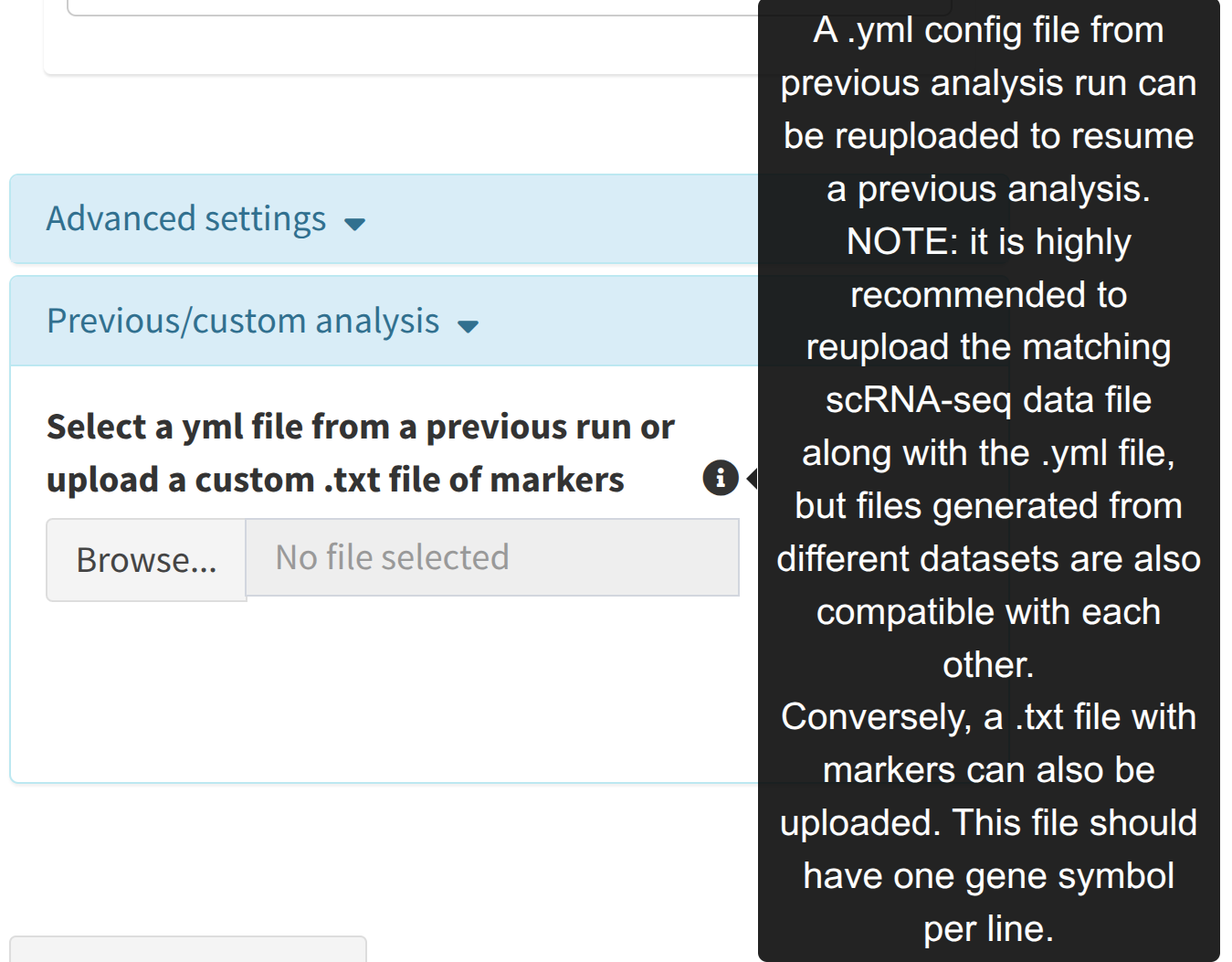
This input expects a .txt file where every line contains a different panel marker (gene symbol) to run through the analysis. If a user uploads a custom list, the panel generation step is skipped, and the custom list is used as the current panel, with all additional features such as adding and removing genes being available. By default, all of the panel markers in the txt list will be placed in the Selected markers table space.
Gene alias conversion
Users who upload custom gene lists may use aliases that are not present in the single cell RNA seq dataset selected. Upon custom upload, Cytomarker will review all gene symbols in the list and check if there are any aliases markers used in the dataset. If any are found, Cytomarker will issue a pop-up modal showing the gene aliases:
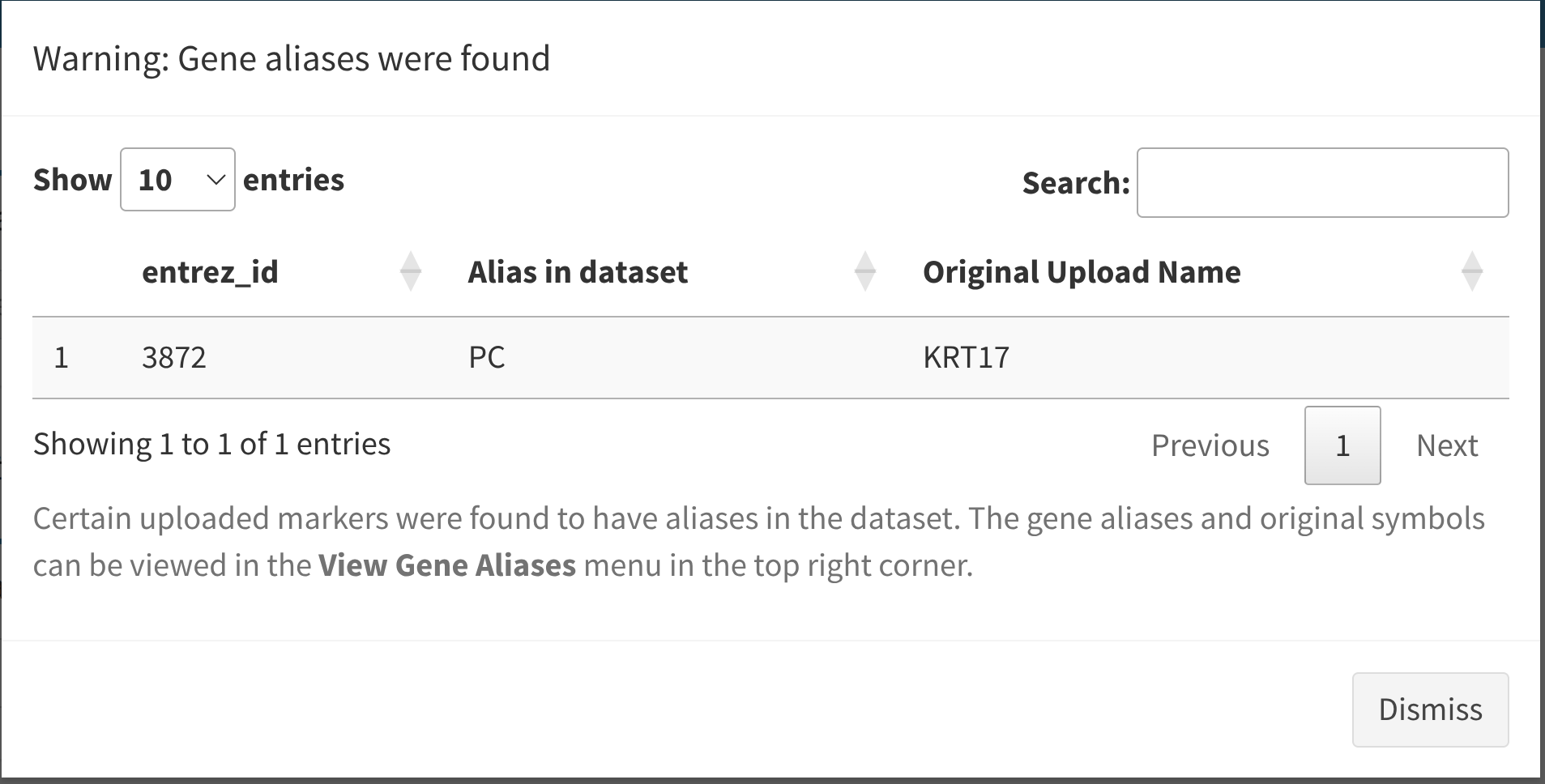
In the example above, the user uploads a list containing KRT17, and Cytomarker is able to infer that PC, an aliases of this gene, is present in the single-cell dataset selected, but not KRT17.
While the current dataset is being used, these aliases are also available by selecting View gene aliases in the top right corner of the application, re-opening this modal at any time.
When gene aliases are found, by default the alias gene symbol is added to the current panel run under Selected markers. These aliased genes can then be moved into Scratch markers if the user wishes to exclude them from the current analysis.
Local sessions: custom gene finding algorithm
Users may wish to fork and include their own gene finding algorithm in Cytomarker. To do this, they will have to modify the following elements of source code in a local session:
- The gene finding function: The function for the gene finding in Cytomarker is found here: https://github.com/camlab-bioml/cytomarker/blob/master/R/analysis.R#L52. The parameters of the function are described in the documentation, but briefly, it will parse a dataset in-session with a string identifier to identify which algorithm to use. The function sets a scoped variable called
marker, which is a list of vectors as below:
marker <- list(
      recommended_markers = c(),
      scratch_markers = c(),
      top_markers = c())
Users should add a conditional based on the desired marker finding name i.e. if the user wishes to name the algorithm my_function_1, then a conditional in the function body:
if(marker_strategy == "geneBasis") {
    # do something to set the marker variable based on a gene finding algorithm
}
Users can set both recommended markers and top_markers to the same set of initial marker recommendations that the custom algorithm provides, and leave scratch_markers empty or NULL. Once the user sets this marker variable in the function, Cytomarker will prune the list to ensure that it matches the size of the reuested panel, as well as checking for cell type multimarkers.
- Make the algorithm selectable in the Cytomarker UI: The input component for the gene selection algorithm in the UI is found here: https://github.com/camlab-bioml/cytomarker/blob/master/R/app.R#L302. Once the function above has been modified with a custom algorithm, the user should add the string identifier to this list to make it selectable when the app is fun. For example, if the function above checks for an algorithm named
my_function_1passed to themarker_strategyargument, then this string option should be added here underchoicesas"my_function_1"="my_function_1", where the first part of the input is the label shown to the user, and the second part after the=is the underlying string identifier used by the app
External gene finding algorithms
The authors of Cytomarker aim to maintain support for various alternative gene finding algorithms, including those not implemented in the R language. The following packages and repositories may be of interest to users who are looking to compare multiple gene finding algorithms on a select dataset to perform more rigorous benchmarking:
-
NSForest: https://github.com/JCVenterInstitute/NSForest: implemented in Python, idealy suited for [Anndata] python objects, where panel lists can be exported as pandas dataframes or as txt flat files. Tutorial: https://nsforest.readthedocs.io/en/latest/tutorial_nsforesting.html
-
scGeneFit: https://github.com/solevillar/scGeneFit-python: implemented in Python, uses linear programming for genetic marker selection. Operates on numpy arrays and it compatible with CITE-seq data.